Choose your notifications
See what the Caryon Lead bell tells you, and pick the events that matter to you.
The bell at the top right of Caryon Lead warns you when something needs your attention: a company handed to you, an action scheduled for you, a morning reminder. You choose what shows up there.
Read the bell
A counter shows the number of unread notifications. Click the bell: it lists the latest 20, with their title, detail and age.
- Clicking a notification opens the item it concerns and marks it as read.
- « Tout marquer comme lu » (Mark all as read) resets the counter.
- The bell also shows the alerts of Caryon ID that concern you (for example someone who joined the workspace): a click opens them in Caryon ID.
You are never notified of what you did yourself.
What notifies you
- Assignments: a company or an opportunity is assigned to you; a company, an opportunity or an action is taken from you.
- Actions: a colleague schedules an action for you; an action you entrusted to a colleague is done.
- Sequences: your sequence stops: the contact refuses to be contacted, a step succeeds, an opportunity opens or a colleague stops it.
- Opportunities: an opportunity is won or lost (its owner, their managers, and the owners and admins of the workspace are told).
- Contacts: a contact asks not to be contacted; the action planned with them still has to be cancelled by hand.
- Companies: one of your companies enters collective proceedings (safeguard, receivership or liquidation published in the BODACC).
- Morning reminders, at most once a day: your actions due before today, your open opportunities whose planned closing date has passed, and the companies you had snoozed on the Radar that come back.
- Contact copies: a member asks to copy contacts to another workspace (owners and admins), or your own request is accepted or refused. These two are also sent by email.
- Caryon team: the SIREN or the directory correction you proposed is approved or refused.
Choose your notifications
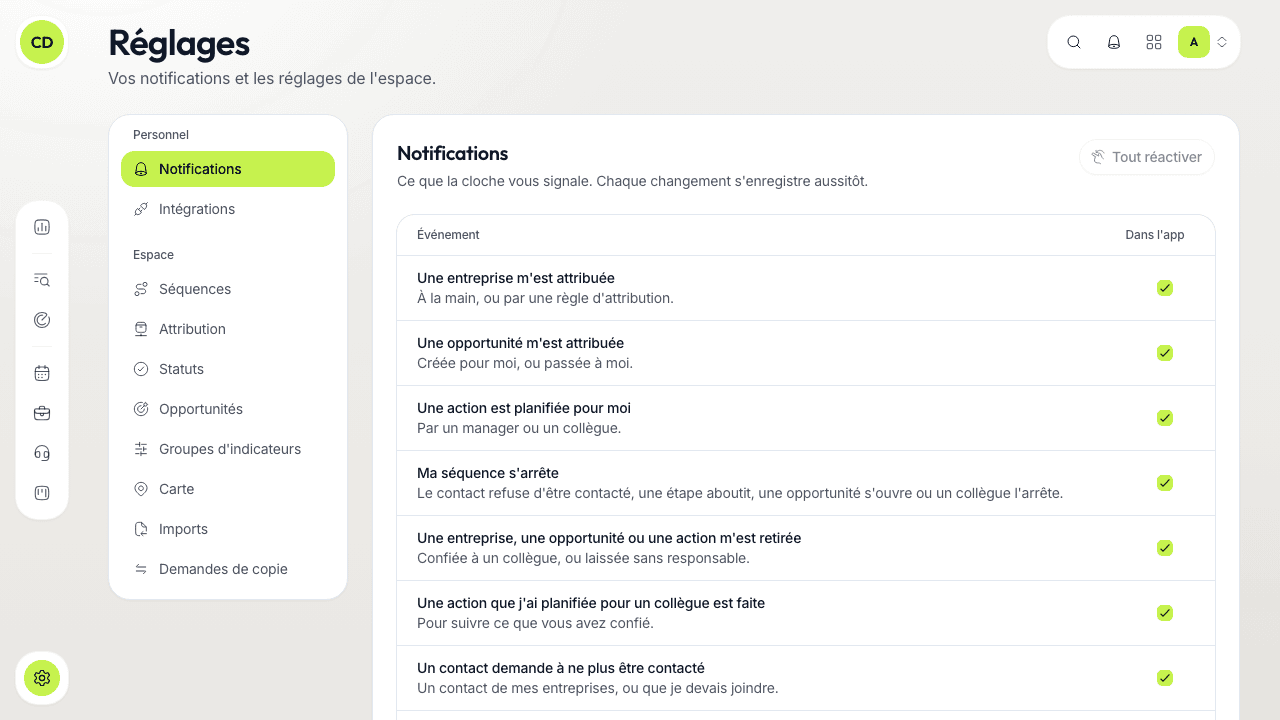
Untick what you do not want
The table has one line per event, written from your point of view (« Une entreprise m'est attribuée », A company is assigned to me; « Mes actions prévues avant aujourd'hui », My actions due before today…), and a « Dans l'app » (In the app) checkbox. Everything is on to begin with. Unticking a box is saved at once.
An unticked event no longer creates a notification for you: if you tick the box again later, what happened in between will not show up. « Tout réactiver » (Turn everything back on) restores every box to its starting state.
Per workspace
Your choices apply to you, in this workspace, whatever your role. In another workspace, you set your notifications separately.
In the app and by email
Notifications show in the bell. Only the contact copy requests are also sent by email. Choosing to receive the others by email does not exist yet.
A question not answered here? Write to us at contact@caryon.app.