Automate your follow-ups with sequences
Build a series of steps across several channels and start it for a contact: Caryon Lead schedules all the actions at once.
A sequence is a series of steps you repeat from one contact to the next: for example an email on day one, a call three days later, a LinkedIn follow-up message on day seven. Instead of scheduling each action by hand, you start the sequence for a contact and all its steps land in your Agenda.
Sequences are optional: you can keep scheduling action by action.
Days are business days
The days of a sequence are counted in business days, public holidays excluded: a « J3 » (day 3) step started on a Thursday falls on the following Tuesday.
Create or edit a sequence
Sequences are managed in « Réglages › Séquences » (Settings › Sequences, « Espace » group): they are shared by the whole workspace, created once and started as often as you like.
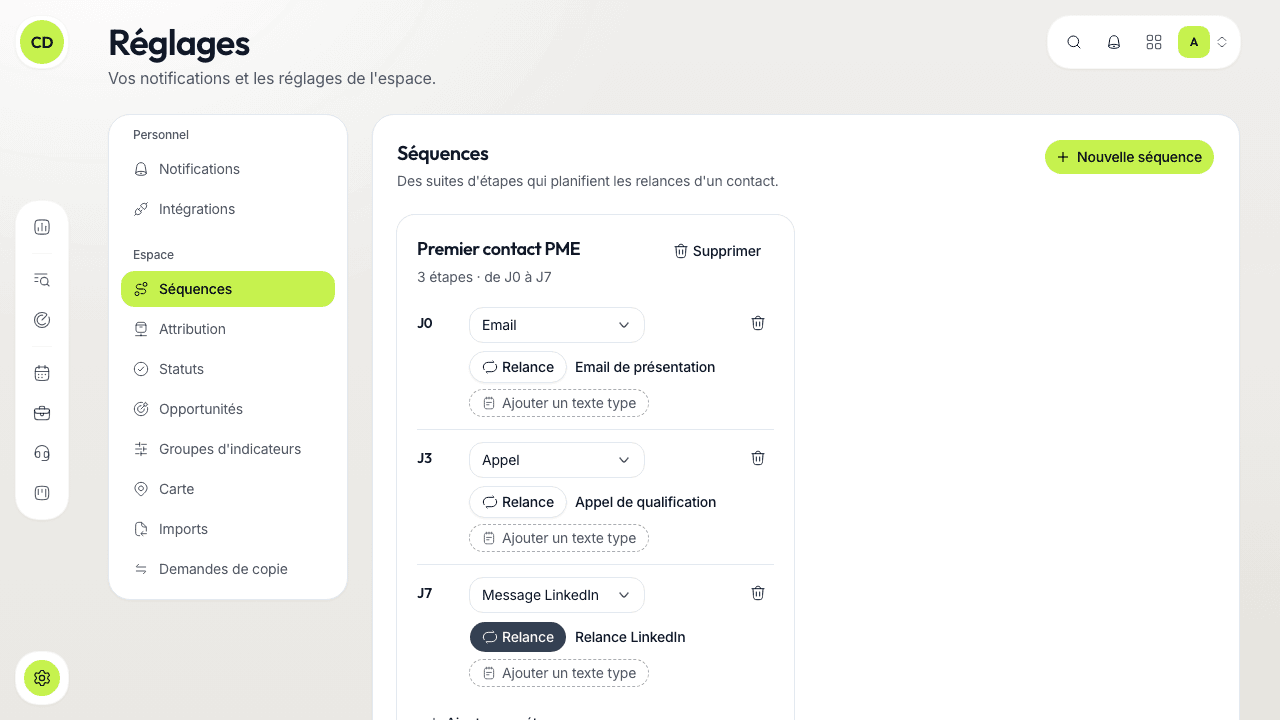
Create the sequence
Click « Nouvelle séquence » (New sequence) and name it (for example « Premier contact PME »). It starts with three steps, to keep or adapt: an email on J0, a call on J3 and a LinkedIn follow-up message on J7.
Set each step
Everything is edited in place, by clicking the value:
- the day of the step (J0, J3, J7…), in business days;
- the type: « Email », « Appel » (Call), « Message LinkedIn » or « SMS »;
- « Relance » (Follow-up): the button that labels the step as a follow-up;
- a title (optional), for example « Relance LinkedIn »;
- a template text: the message to send or the points to cover. It is copied into the notes of the scheduled action.
Add or remove steps
« Ajouter une étape » (Add a step) adds a call at the end, two business days after the last step, for you to adapt in place; a step's bin deletes it, after confirmation.
Editing a sequence does not change what is already scheduled for contacts already enrolled. Deleting a sequence removes it from the list of sequences on offer; the contacts following it go through the actions already scheduled for them.
Start a sequence for a contact
A sequence applies to one contact, never to a company alone.
Open the contact's sequence
On the company's record, « Contacts » tab, click the « Séquence de prospection » icon on the contact's line. The « Séquence » block opens.
Click « Lancer une séquence »
Choose the « Séquence » and the « Premier jour » (First day). The « Étapes » (Steps) show each on its date: for this contact only, you can shift a date or remove a step.
Confirm with « Lancer la séquence »
All the actions are created at once, at 9 am, and show in the Agenda with the « Séquence » label. They stay editable one by one.
A contact has only one sequence running at a time, and a contact who asked not to be contacted again cannot be enrolled.
Follow and stop a sequence
The contact's « Séquence » block shows the running sequence: the number of steps done out of the total, and the « Prochaine » (Next) step with its date. When nothing is running, it recalls how the last one ended.
To stop it by hand, click « Arrêter » (Stop) and confirm: the remaining steps are cancelled, those already done stay in the history.
A sequence also stops by itself:
- when the contact asks not to be contacted again;
- when a step succeeds (for example a meeting is booked);
- when an opportunity is opened on the company.
It is finished when no step is left to do.
Go further
A question not answered here? Write to us at contact@caryon.app.