Spot high-potential companies with the Radar
The Radar scores the companies to approach every day from public signals; sort them, queue them for calls, snooze them or dismiss them.
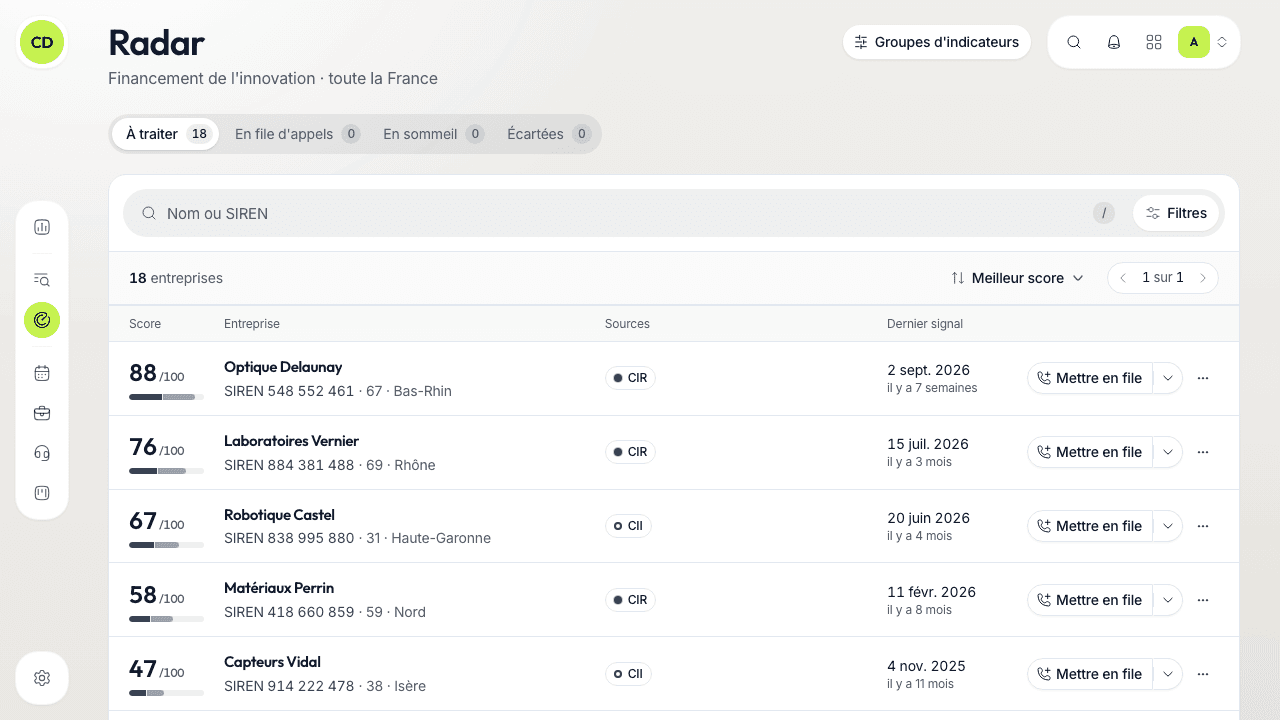
The Radar (under Trouver, Find, in the menu) ranks the companies in France that fit your target, from public signals read every night: patents filed, approvals, ADEME aid, capital changes… The more of the active group's criteria a company meets, the higher its score. There is nothing to search for: the list is already sorted from the best score down.
Read the score
The score is a number out of 100, with a coloured gauge. The gauge is split into segments of equal width, one per family of criteria the company meets (patents, approval, aid, capital, company profile). The width of a segment does not say how many points it is worth.
On each row you see:
- the score and its gauge;
- the company: its name, department, activity, SIREN, and the Au portefeuille (In the portfolio) badge if your workspace already follows it;
- the sources: one pill per source, with the number of facts found;
- the latest signal, with its date.
Click the row or the name: the company panel opens on the right, with the criteria it meets (« Agrément CIR ou CII en cours »…) and its proofs, each with a link to its source. The list stays usable behind the panel; Esc closes it.
The scale is the same for everyone
The score does not depend on your settings: they filter the list without changing the scores. A score only makes sense within one group of indicators; do not compare the scores of two groups.
Work the list
Four lists reflect your team's decisions, each with its number of companies:
| List | What it holds |
|---|---|
| À traiter (To handle) | Nothing decided yet, or a snooze has run out |
| En file d'appels (In the call queue) | Companies queued from the Radar |
| En sommeil (Snoozed) | Companies you will look at again later |
| Écartées (Dismissed) | Companies you dismissed, with their reason |
A decision applies to the whole team. Filter with the « Nom ou SIREN » (Name or SIREN) field, « Localisation » (the departments of the head office; with no choice, your workspace's territory), « Sources » and « Portefeuille » (Toutes, Au portefeuille, Hors portefeuille: all, in the portfolio, outside it), and sort by Meilleur score (best score) or Signal le plus récent (most recent signal).
Queue a company for calls
In the « À traiter » (To handle) list, click « Mettre en file » (Add to the queue) on the row: a call to the company's switchboard joins your prospecting queue, at the next half hour, with the proofs as notes. If the company was not in the portfolio, it joins it. A message offers « Annuler » (Undo) for a few seconds.
The arrow attached to the button lets you choose whom to call and when, and write « Ce que vous direz en décrochant » (What you will say when they pick up), already filled in with the proofs.
The other gestures, in the « ⋯ » menu
- Ajouter au portefeuille (Add to the portfolio) — for a company your workspace does not follow yet; it stays on the Radar.
- Mettre en sommeil (Snooze) — for 1 mois (month), 3 mois, 6 mois or 1 an (year). The company returns to « À traiter » on the chosen date.
- Écarter (Dismiss) — pick a reason, shared with the team: Hors cible (off target), Déjà client (already a customer), Concurrent (competitor), Trop petit (too small), Pas le bon moment (bad timing) or Injoignable (unreachable). The company keeps its score but leaves the « À traiter » list.
- Remettre à traiter (Put back to handle) — from the other lists, to reopen a company.
The alerts at the top and the bottom
Above the list, a red band flags collective proceedings (insolvency procedures) affecting companies in your portfolio; « Voir le détail » (See the detail) lists them. At the bottom, « Signaux orphelins » (Orphan signals) groups patents whose applicant could not be matched to a company in the register: if you know the company, you can « Proposer le SIREN » (Suggest the SIREN), which the Caryon team then checks.
Choose what the Radar reads: indicator groups
An indicator group says what the Radar reads and how it scores, for a given target. Only one group is active at a time in your workspace. Open them with the « Groupes d'indicateurs » button at the top of the Radar, or in Réglages › Groupes d'indicateurs.
On that screen, the active group (Actif badge) is adjusted like this:
- Sources lues (Sources read) — untick a source and its companies leave the Radar (at least one stays ticked);
- Territoire (Territory) — the departments watched, all of France by default;
- Secteurs suivis and Secteurs exclus (Followed and excluded sectors) — keep only some activities, or leave some out;
- Score minimum (Minimum score) — a slider from 0 to 100: below it, the company does not clutter the list.
The catalogue underneath shows the other groups (« Catalogue Caryon » or « Propre à votre espace » — specific to your workspace; « Disponible » or « En construction » — available or under construction). « Activer ce groupe » (Activate this group) switches groups after confirmation: your decisions on the previous group are kept and come back with it. Adjusting or switching groups is reserved for people allowed to edit these settings.
What the Radar does not do
- It does not read social networks and does not look up emails or phone numbers for you: it tells you which companies to approach, not how to reach them.
- It never keeps a company that asked for its data not to be published.
- It does not yet adjust its scale from the meetings you obtain: your decisions (queue, snooze, dismiss) organise your list, they do not change the scores.
A question not answered here? Write to us at contact@caryon.app.