Find new companies
Search any French company by activity, place, size or executive, then add the ones you want to your portfolio.
The Recherche d'entreprises (Company search) page, under Trouver (Find) in the menu, queries the official register of French companies. It does not only show the companies your workspace already follows: every company in France is there, and you pick the ones to add to your portfolio.
Run a search
Open the page
Click Recherche d'entreprises in the menu, or press G then E.
Set your criteria
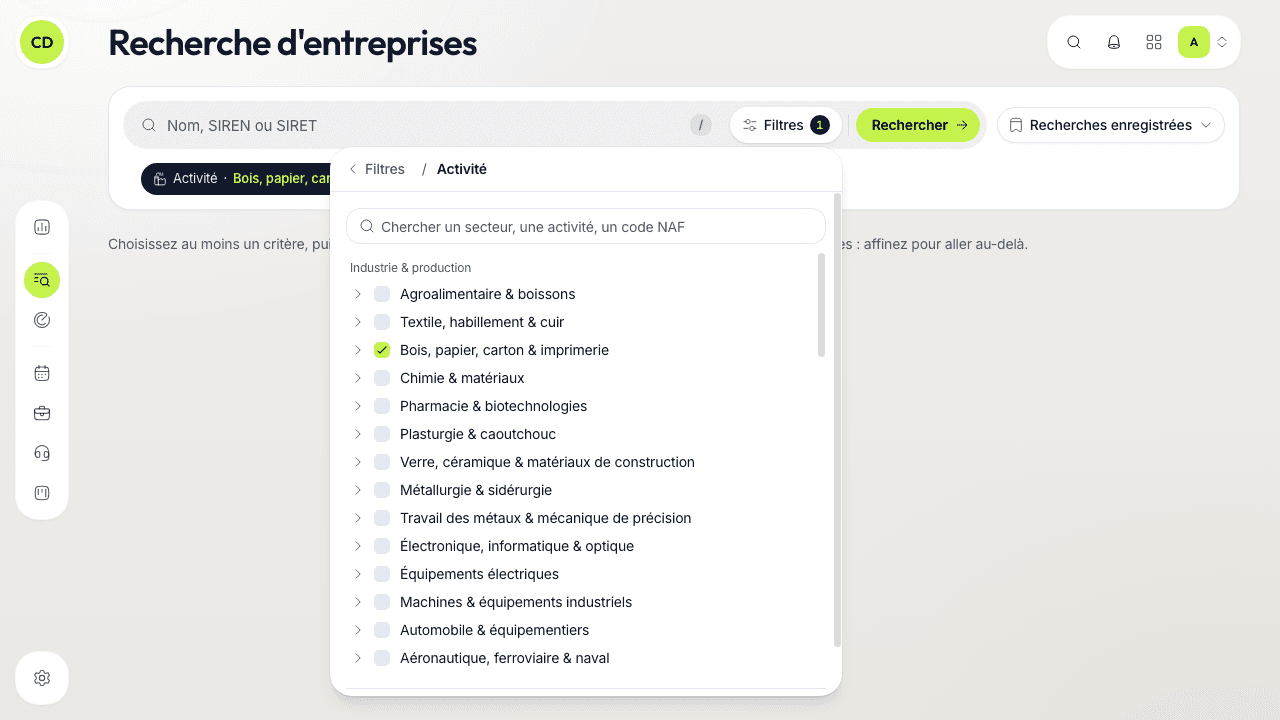
Type a name, a SIREN or a SIRET in the « Nom, SIREN ou SIRET » (Name, SIREN or SIRET) field (key /), and/or click « Filtres » (Filters) to open the families of criteria. Each criterion you set becomes a pill under the bar (for example « Localisation · Haut-Rhin »): click it to reopen it, click its cross to remove it.
Click « Rechercher » (Search)
The register is only queried at that moment, never while you type. If you change a criterion afterwards, the button becomes « Mettre à jour » (Update): click it to run the search again.
The criteria
| Family | What you can choose |
|---|---|
| Activité (Activity) | Business sectors, grouped in broad families, or more precise activities |
| Localisation (Location) | Regions, departments (on the map or by name) or postcodes |
| Taille (Size) | Headcount and company category |
| Finances | Revenue and net result |
| Forme et labels (Legal form and labels) | Legal form and labels |
| Dirigeant (Executive) | The name of an executive |
Each panel is emptied with « Effacer » (Clear); « Tout effacer » (Clear all) empties every criterion at once.
Activity: a tree to tick
Tick a whole sector, or unfold it with its arrow to keep only some activities, listed with their code (« 64.19Z · Autres intermédiations monétaires »). A sector only partly ticked shows a dash and the number of codes kept (« 3/12 »). The search field at the top of the tree finds a sector, an activity or a code: type « logiciel » (software) or « 62.01 ».
Legal form: by family
Legal forms are grouped in families (sole trader, SARL, SAS, civil companies, associations…). Tick a whole family, or unfold it to choose form by form; « Chercher une forme juridique » (Search a legal form) finds a form by name.
SASU and EURL
The register files SASUs under SAS and EURLs under SARL. Search « SAS » or « SARL » to find them.
Save a search
A search you run often can be saved: open « Recherches enregistrées » (Saved searches), then « Enregistrer la recherche… » (Save the search…), name it, and run it again in one click from the same menu. Keep it for yourself or, if you can edit companies, share it with your team.
Read the results
Results appear in a table (company, city, headcount, status), with their number at the top and the current page (« page 1 sur N », page 1 of N), 50 results per page. Beyond the first 10,000, narrow your criteria. On the right, a map shows the sites of the page; « Agrandir la carte » (Enlarge the map) opens it full screen, with the criteria bar on top. With the keyboard, J and K move from one result to the next.
When your search names a place (region, department, postcode), each result shows the company's sites located there, and recalls the city and department of the head office.
A partly typed name is often found: if the full text gives nothing, Caryon Lead treats its last word as a word still being typed. « chalouz festi » thus finds Chalouz Festival. A single partly typed word (« chalo ») is not completed.
Add companies to the portfolio
A badge tells where each result stands: Nouvelle (New), Dans l'annuaire (In the directory) or Dans le portefeuille (In the portfolio: your workspace already follows it).
- One company — click « Ajouter au portefeuille » (Add to the portfolio) on its row. A window lists its sites: the head office and, if you searched a place, the sites in that place are already ticked (with more than 10 sites in the place, only the head office is). Adjust, then click « Ajouter » (Add).
- Several companies — tick their rows, then click « Ajouter N entreprises » (Add N companies) in the bar that appears. No window: the sites in the searched place are added for each company (if it has more than 10 in that place, add it row by row to choose). You can tick 50 at most at a time.
You can then open its record to add contacts. You need the right to create companies to add them; without it, the search stays read-only.
Companies already followed
A company already in the portfolio is not added twice: its result carries the Dans le portefeuille badge, and the Enter key opens its record. If it has no active site left in the searched place, its row says so (« Aucun site actif dans le 68 », no active site in the 68) and recalls its head office.
To find a company you already follow, use the portfolio instead: it filters what your workspace already follows. To drop a whole list at once, see import.
A question not answered here? Write to us at contact@caryon.app.
Track your opportunities in the pipeline
Open an opportunity, move it from stage to stage on the board and keep an eye on the ones that are sleeping.
Spot high-potential companies with the Radar
The Radar scores the companies to approach every day from public signals; sort them, queue them for calls, snooze them or dismiss them.